Claudealot
ClaudeALot-Bookkeeping - A Year Of Books. In A Flash
ClaudeALot-Bookkeeping - A Year Of Books. In A Flash
Couldn't load pickup availability
📩 How you get access: within a few minutes of checkout you'll receive an email with your course sign-in from our course platform (Thinkific). Don't see it? Check spam or promotions, or email gary@garyfong.com and we'll get you in.
ClaudeALot · Complete Video Training Course
Bookkeeping is obsolete. Welcome to the machine age.
Turn a year of messy business records into organized, source-backed books your CPA can actually work with.
ClaudeALot teaches you how to use AI to do the grinding work behind your books: gathering source documents, organizing transactions, categorizing expenses, reconciling accounts, tracking substantiation, preparing standard reports, and building the final package for your CPA.
Claude does not get to invent the answer. Your bank statements, credit-card statements, receipts, mileage records, payout reports, tax forms, and other primary-source documents remain the foundation of the system.
Know Exactly What You're Buying
This listing is for the ClaudeALot video training course.
The printed ClaudeALot book is also available separately. You do not have to buy a bundle. If you start with the course and decide later that you want the physical book, you can buy the book separately.
Claude itself is a separate third-party service and is not included with your ClaudeALot purchase. The course shows you exactly how to set it up and use it for the workflow.
You don't hand your books to AI and hope.
ClaudeALot uses a very different model:
1. GATHER
Collect the records that actually prove what happened.
2. BUILD
Let Claude organize, categorize, compare, reconcile, and identify questions that need a human answer.
3. PRESENT
Turn the finished work into clean reports and a documented CPA handoff package.
What's Inside
- 7 chapters · 30 illustrated lessons — step-by-step instruction designed so you can see what to click, what to save, what to ask, and what the finished result should look like.
- The GATHER → BUILD → PRESENT system — a repeatable workflow for turning raw records into organized books.
- Claude-assisted categorization — organize transactions into business-expense categories and map the finished books to Schedule C reporting.
- Reconciliation — compare what Claude produced against your actual statements instead of trusting an AI-generated total.
- Source-document tracking — maintain the connection between a reported number and the records supporting it.
- Mileage substantiation — organize business mileage separately and preserve the records supporting the calculation.
- Home-office documentation — measure it, photograph it, calculate it, and preserve the supporting information.
- 1099 and tax-document review — keep reporting forms visible instead of burying them inside a pile of transactions.
- Tax-authority references — key lessons show you the rules and substantiation principles behind the bookkeeping decisions being discussed.
- Maya Parker's complete fictional practice case — work through realistic source documents before touching your own books.
- The finished CPA handoff — reports, supporting schedules, source references, and a presentation system designed to make professional review easier.
The records come first. AI comes second.
ClaudeALot is built around primary-source documents. You are not asking an AI to remember your year or guess what happened.
Bank statements.
Credit-card statements.
Receipts.
E-commerce payout reports.
Mileage records.
1099s and other tax forms.
Claude's job is to help you organize and analyze those records — not replace them.
How it works — every step covered
I walk you through the workflow from an empty folder to the finished CPA package.
- Set up Claude and your working folder — create a dedicated financial workspace and control which folder Claude works with.
- Download the year's bank and credit-card statements — start with records issued by the financial institutions themselves.
- Collect e-commerce records — organize payout reports and other business-platform records without double-counting transactions already represented elsewhere.
- Sweep your email for receipts — use targeted searches to recover records hiding in your inbox.
- Recover and organize mileage — separate business travel from personal driving and document the result.
- Document the home office — measurements, photographs, calculations, and supporting notes.
- Build the transaction ledger — have Claude organize the raw data while preserving links back to the source.
- Resolve the questions — Claude identifies ambiguous transactions; you supply the facts.
- Reconcile — compare the result against the actual statements and correct discrepancies.
- Generate standard reports — including a clean Profit & Loss statement for professional review.
- Build the CPA package — organize the finished reports, schedules, supporting data, and source-document trail.
- Hand it to your CPA — with a clear explanation of what you did, what you did not do, and where the supporting records live.
Your Workspace
Claude works from the financial workspace you choose.
The course shows you how to create a dedicated folder for the bookkeeping project and give Claude access to the material needed for that project.
You remain responsible for deciding what information to place in that workspace and for reviewing Claude's output before relying on it.
The full course — 7 chapters, 30 illustrated lessons
Lessons are arranged in sequence so you learn the system on Maya's fictional files before applying the same method to your own year.
Welcome
Meet ClaudeALot · Understand the system · Set up Claude · Build the workspace you'll use throughout the course
Meet Maya & Meet Claude
Meet Maya Parker, our fictional practice client · Open her practice files · Point Claude at the correct folder · Learn how to ask for work and save the result
See It Work
Watch Claude work against actual practice documents · Follow the source references · See the difference between an AI answer and a supported bookkeeping conclusion
GATHER Your Year
Build the folder structure · Download bank and credit-card records · Sweep your email for receipts · Collect platform records · Recover mileage · Document the home office · Gather 1099s and other year-end tax documents
BUILD — Claude Does the Grinding
Create the ledger · Categorize transactions · Resolve ambiguous expenses · Map expenses to Schedule C reporting categories · Find duplicates and inconsistencies · Reconcile the result against the source records
PROVE — Substantiation
Receipts · Source references · Mileage records · Home-office support · Tax forms · Supporting schedules · Independent AI checking as an error-detection layer
PRESENT — The CPA Handoff
Generate the reports · Assemble the supporting material · Build the presentation package · Prepare the handoff · Store the records so you can find them later
Meet Maya Parker.
Maya Parker is a fictional self-employed wedding photographer created specifically for ClaudeALot.
Her practice files give you a safe place to learn the system before working with your own financial information.
You work through statements, transactions, receipts, mileage, tax documents, supporting records, categorization questions, reconciliation, reporting, and the finished presentation package using the same method you'll later apply to your own business.
Why Practice First?
Because learning bookkeeping software while staring at your own financial life is stressful.
With Maya, you can make mistakes, repeat a prompt, compare your result, and understand what Claude is doing before your own money enters the workflow.
What you walk away with
Organized books. Transactions collected, categorized, reviewed, and reconciled against the underlying records.
A source-backed ledger. The numbers are not floating in an AI conversation. The system is designed to preserve the records behind them.
A substantiation package. Mileage, home office, receipts, tax documents, and supporting schedules organized for review.
A CPA-ready handoff. Clean reports and organized supporting material designed to make your CPA's review easier.
A system you can use again. Run the workflow throughout the year instead of rebuilding your financial life every tax season.
Look inside.
Sample pages from the fictional Maya Parker materials show how the workflow moves from source documents to organized books and professional presentation.
GATHER · Sample Page
Source Document Inventory
Start with the evidence. Build a record of the statements, reports, forms, and supporting documents available for the year.

BUILD · Sample Page
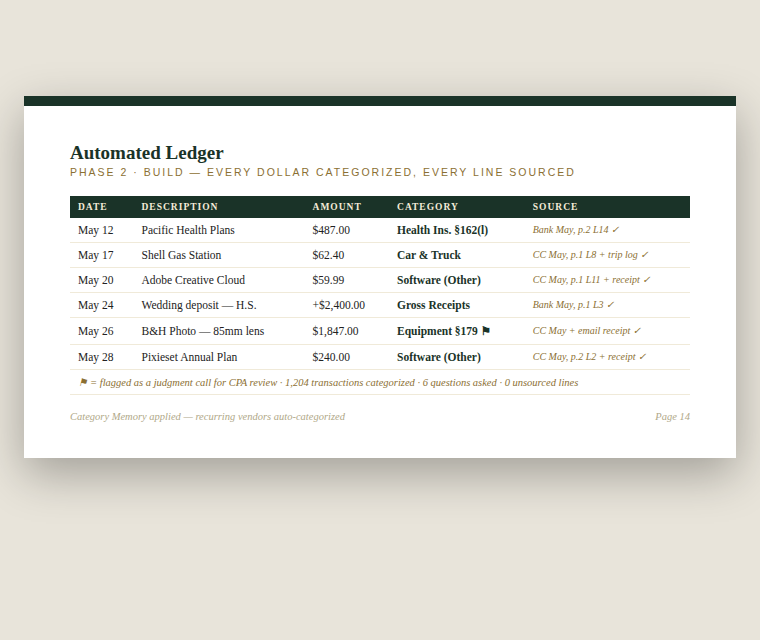
Transaction Ledger
Organize transactions into a reviewable ledger while preserving the connection to the underlying source records.

PRESENT · Sample Page
Profit & Loss Statement
Turn the reconciled ledger into a clean financial report your CPA can review against the supporting work.

Prefer Paper?
The ClaudeALot book is available separately.
You can buy the course by itself, the book by itself, or add the book later.
You are not locked into a bundle just because you decide halfway through the course that you would rather have the material sitting beside your computer in print.
Your CPA is still the CPA.
ClaudeALot is not about pretending an AI is a tax professional.
The goal is to stop paying professional rates for work you can organize before the professional ever sees it.
You gather the evidence.
Claude does the grinding.
You verify the work.
Your CPA makes the professional tax decisions and files the return.
7-day satisfaction guarantee
- Try the method before you decide. The refund window remains open until you complete the Maya demonstration section or 7 days from purchase, whichever comes first.
- Files you've already downloaded remain on your computer.
- Streaming course access ends when a refund is issued.
- Printed books are final sale. Physical products cannot be returned through the digital-course guarantee.
- One course refund per customer. Re-purchase after a refunded course may be restricted to prevent temporary-access abuse.
The Most Important Part
You stay in control of the books.
AI can read faster, sort faster, compare faster, and perform repetitive work faster than you can.
But the source documents decide what actually happened.
Claude does the grinding.
The evidence keeps it honest.
You hand your CPA the finished work.
ClaudeALot is an educational bookkeeping and record-organization course. It does not provide tax, legal, accounting, or investment advice and does not replace advice from a CPA, enrolled agent, attorney, or other qualified professional. Claude is a third-party product provided by Anthropic; availability, features, terms, and pricing are controlled by Anthropic and may change independently of ClaudeALot.